


Route: Package Tracker
4.714.48K Reviews
App Specs
- Version
- 2.178.0
- Updated On
- License
- Free
- Downloads
- 5,000,000+
- Developer
- Route App Inc
- Categories
- Shopping
- Platform
- Android, iOS
Screenshots
 Analysis by AppCompare
My usual package routine used to be scattered across retailer emails, carrier pages and the occasional saved tracking number I couldn’t find when I needed it. Route: Package Tracker is meant to bring that trail into one place, and I find the idea most useful when several orders are moving at once. The key question is not whether it can replace every carrier’s own service, but whether a shared view makes the everyday job of keeping tabs on deliveries less fiddly.
When several orders become hard to follow
A single parcel is easy enough to check on its own. The clutter starts when one order is coming through a retailer’s preferred carrier, another has a separate tracking page, and a third is still only represented by a shipping email. That is the kind of situation where I would reach for a package tracking app: not because each carrier’s page is useless, but because switching among them makes it harder to see what needs attention today.
Route is a free shopping app from Route App Inc. It has a 4.7 average from around 189,000 ratings, and has been installed over 5 million times. Those figures suggest it has found a substantial audience, though popularity alone won’t tell you whether its workflow fits yours. Its Teen age rating is worth noticing for households choosing apps for younger users, while the app itself is focused on keeping delivery information together rather than making shopping decisions for you.
From adding an order to checking its progress
My practical advice is to start with a small test: add a parcel you are already expecting and see how clearly Route presents its progress before relying on it for a busy week. The app can bring tracking information together for orders handled by services such as Amazon, FedEx and USPS. If an order is not picked up automatically, entering its tracking number gives you another way to bring it into the same place. That fallback matters: email import can save effort, but manual entry is the more dependable habit when an important parcel is missing from the list.
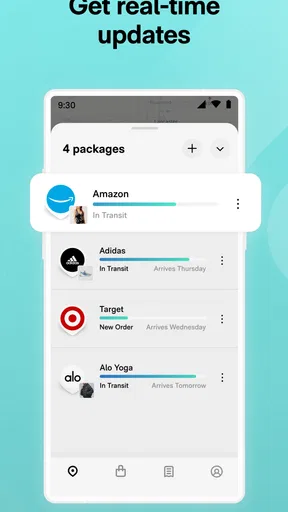
For a household with several deliveries, the useful routine is to check the consolidated view once rather than opening each message and carrier page in turn. Sorting by carrier or date can help answer two different questions: which service is handling a parcel, and which expected deliveries are close together? I would use those groupings as a way to orient myself, not as a promise that every item will arrive on a particular day. Carrier updates are the underlying source of a tracking timeline, so a quiet stretch does not necessarily mean the app has stopped working.
Notifications, maps and the handoff to the carrier
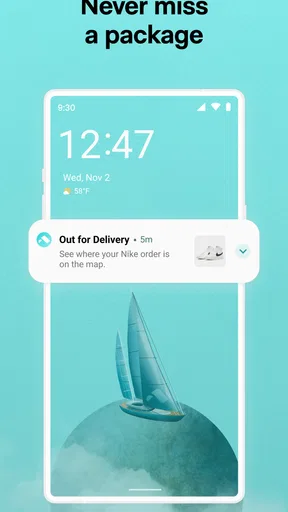
Notifications can reduce repeated checking, especially when I’m busy and only need to know when there is a meaningful change. They are most useful as prompts to look at the order, not as a substitute for planning around a firm appointment. If I’m expecting something that needs my attention, I still check the carrier’s own details before leaving home; a general tracking alert is helpful, but the carrier is the better place to resolve a delivery-specific question.
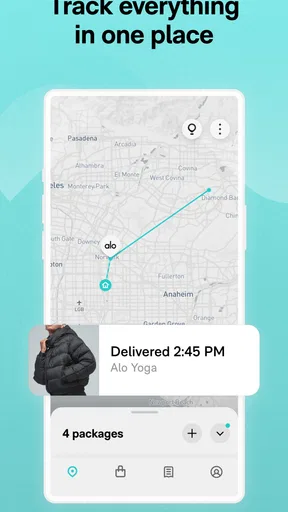
The map view gives the journey a visual shape, which can be satisfying when a parcel is travelling between cities. I’d treat it as context rather than a live vehicle locator. A map can make progress easier to understand, but it does not turn every scan into a precise estimate of where the driver is or when the doorbell will ring. That distinction helps avoid the familiar trap of watching a moving icon and assuming it guarantees an imminent arrival.
Worth Reading Before You Choose

EA SPORTS FC Mobile 26 Is a Bigger Football Game, but It Takes Time

Flipboard Shows What News Apps Must Do Beyond the Feed

Switching to Android Auto Means Rethinking Your Driving Routine

Google Calendar Makes a Crowded Week Easier to Manage

Ludo King Makes the Most of the Minutes Between Plans

Baby Panda World Brings Quick Play to Modern Phones, but Its Game Library Feels Busy
Where Route helps—and where I would use something else
Route makes the most sense for people who order online often enough to lose track of which email belongs to which parcel, or for anyone coordinating deliveries across more than one carrier. Its email syncing can cut down on copying numbers, and the manual option gives you a practical backup. I’d also consider it when several people in a home are trying to keep a rough eye on incoming orders, while being careful not to assume that a shared household workflow exists unless the app itself offers the controls you need.
If you only receive an occasional parcel, a retailer’s order page or the carrier’s own app may already be enough. Those direct sources are often the better choice when you need carrier-specific instructions or want to handle a delivery issue at its source. Route’s advantage is the combined overview; its trade-off is that an overview cannot make every carrier’s scans equally detailed or timely. I would keep the carrier app handy for exceptions rather than expecting one tracker to solve every last-mile problem.
Getting Started with Route
First things first, installing Route: Package Tracker is a breeze. Available on both Android and iOS, just a quick download and you’re ready to rock. The interface is sleek, clean, and super intuitive. No tech degree required here, folks! Everything is laid out in a way that makes sense, even for those of us who aren’t exactly tech-savvy.
Tracking Made Simple
So, what’s the scoop? You can track your packages from all major carriers in one single app. No more juggling between different websites and apps. Just enter your tracking number, and boom – you’ve got all the details right there. The app pulls in real-time updates, so you’re always in the loop.
One of my favorite features? The visual map. It lets you see exactly where your package is in real time. Watching your package travel from city to city is oddly satisfying. Plus, you get notifications on your phone every step of the way, so you know when it’s time to sprint to the door.
Features That Make a Difference
Let’s talk features. Aside from the basic tracking, Route offers a bunch of extras that make it stand out. There’s the "Green" feature, which lets you offset the carbon footprint of your deliveries. It’s a nifty way to feel good about your online shopping habits.
The app also allows you to organize your deliveries by dates or carrier, making it super handy if you’ve got multiple orders on the go. You can also sync the app with your email to automatically import tracking numbers. Less manual entry, more chill time!
The User Experience
Using Route is like having a personal assistant in your pocket. The app is designed to be stress-free and efficient. With a modern design and user-friendly navigation, it’s clear the developers put a lot of thought into the user experience.
One thing that’s particularly cool is the app’s ability to recognize patterns. If you regularly order from certain retailers, Route picks up on this and streamlines the tracking process even further. It’s like the app gets to know you and your shopping habits.
A realistic delivery-day routine
Imagine I have a parcel due while I’m working, another order just dispatched, and a third still waiting for its first carrier scan. I can use the combined list to see which one has actually moved, check the date grouping to spot what may need attention, and let a notification tell me when there is a new event. That keeps me from repeatedly searching my inbox. If the first parcel’s status becomes urgent, I would then switch to the carrier’s own page for the precise delivery options rather than treating the overview as a control panel.
There is also a useful distinction between tracking and managing. Route can help me notice that an order is on its way, but I shouldn’t assume that seeing it in the app means I can change its address, delivery window or instructions there. For changes that affect the handoff at the door, I would go directly to the retailer or delivery company. Keeping that boundary clear prevents a convenient tracker from becoming a frustrating middleman.
Small habits that make the overview more useful
I’d connect email syncing only if the convenience is worth having order messages feed into the tracking workflow. If I prefer to keep shopping receipts separate, manually adding just the parcels I care about is a reasonable alternative. Either way, I would check that an order appears after purchase instead of assuming every confirmation email will be recognized. The time saved is greatest when the list stays relevant; a cluttered feed of old or unimportant orders defeats the point of consolidation.
When several parcels have similar names or arrive close together, the carrier and date groupings are more practical than relying on memory. I would also avoid interpreting a lack of movement as a definite problem: some shipments simply provide fewer visible scans between milestones. The app is at its best as a quiet organizer and reminder, not as a guarantee that every stage of a journey will be reported in detail.
Version, compatibility and expectations
The current version is 2.176.1, and the listed minimum operating system is Android 8.0. That makes OS compatibility worth checking before installing on an older Android device. The app is free, so it is easy to try with one active delivery and decide whether its combined view actually saves you time. I’d judge it on whether I can find an order quickly and whether its alerts fit my routine, rather than on how animated or detailed the tracking screen looks.
Route is a shopping-category app, but its value is logistical rather than inspirational: it helps keep the aftermath of online ordering organized. It is not the right fit for someone who wants only the authoritative instructions from a particular carrier, or for a person who rarely has more than one parcel to follow. For frequent shoppers, though, an all-in-one view can be a worthwhile layer between the retailer’s confirmation and the carrier’s final delivery details.
Is Route for You?
So, who will love this app? Honestly, anyone who shops online. If you’re a frequent online shopper or someone who just likes to keep tabs on their deliveries, Route is a no-brainer. It takes the guesswork out of tracking and lets you focus on what really matters – like deciding what to order next!
Even if you’re not a shopaholic, the app’s straightforward approach to package tracking is worth checking out. It’s reliable, fast, and does exactly what it promises, which is a lot more than you can say for some other apps out there.
In a nutshell, Route: Package Tracker is a must-have for anyone who wants to keep their delivery game strong. It’s easy to use, packed with features, and makes package tracking a breeze. Who knew tracking could be so much fun?
Pros
- User-friendly interface for easy navigation.
- Supports tracking across multiple carriers.
- Real-time updates on package status.
- Customizable notifications for delivery alerts.
- Secure login for protecting personal data.
Cons
- Limited offline functionality.
- Ads can be intrusive at times.
- Some features require premium subscription.
- Occasional delays in tracking updates.
- No direct customer support chat.
FAQs for Route: Package Tracker
What platforms is Route: Package Tracker available on?
Route: Package Tracker is available for both Android and iOS devices. You can download the app from the Google Play Store or the Apple App Store. It's designed to integrate seamlessly with your device, providing real-time updates and notifications about your packages.
How does Route: Package Tracker work?
Route: Package Tracker works by syncing with your email to automatically detect and track your online purchases. It consolidates all your shipments into one easy-to-view interface, providing real-time updates and delivery notifications, so you can track your packages effortlessly.
Is Route: Package Tracker free to use?
Yes, Route: Package Tracker offers a free version with essential tracking features. However, for more advanced features and an ad-free experience, there is a premium version available as an in-app purchase. This allows users to enjoy enhanced functionalities and a smoother interface.
What features make Route: Package Tracker stand out?
Route: Package Tracker offers several standout features including real-time tracking, push notifications, and a visually appealing map view. Additionally, it supports a wide variety of carriers globally, ensuring you're always informed about your package's journey, regardless of the shipping provider.
Is my data secure with Route: Package Tracker?
Route: Package Tracker prioritizes user privacy and data security. The app uses encryption to protect your information and does not share personal data with third parties. You can manage permissions and settings to further enhance your privacy according to your preferences.


